Flipster - Digital Magazines
- 2.5
- Rating
- 100.00K
- Installs
- Free
- Price

 Analysis by App-foxy
I approached Flipster as a library reader rather than as a general magazine subscription service, and that distinction matters from the first screen. It is a free News & Magazines app from EBSCO Information Services that lets eligible library users read digital magazines through their library’s access. The basic idea is appealing: instead of carrying a paper issue or searching several separate publisher apps, I can use one library-connected place for the titles my library makes available.
My overall impression is mixed but useful. Flipster can be a convenient reading shelf when the library collection matches my interests, especially for occasional browsing on a phone or tablet. At the same time, the experience is not as universally smooth as the simple concept suggests. The average rating sits at 2.5 from around 395 ratings, which reflects the kind of frustration that can appear when access, navigation, or reading controls do not behave as expected. I would not dismiss it because of that score, but I would treat it as a practical library tool rather than a polished replacement for every magazine-reading option.
How readable and navigable is the library magazine experience?
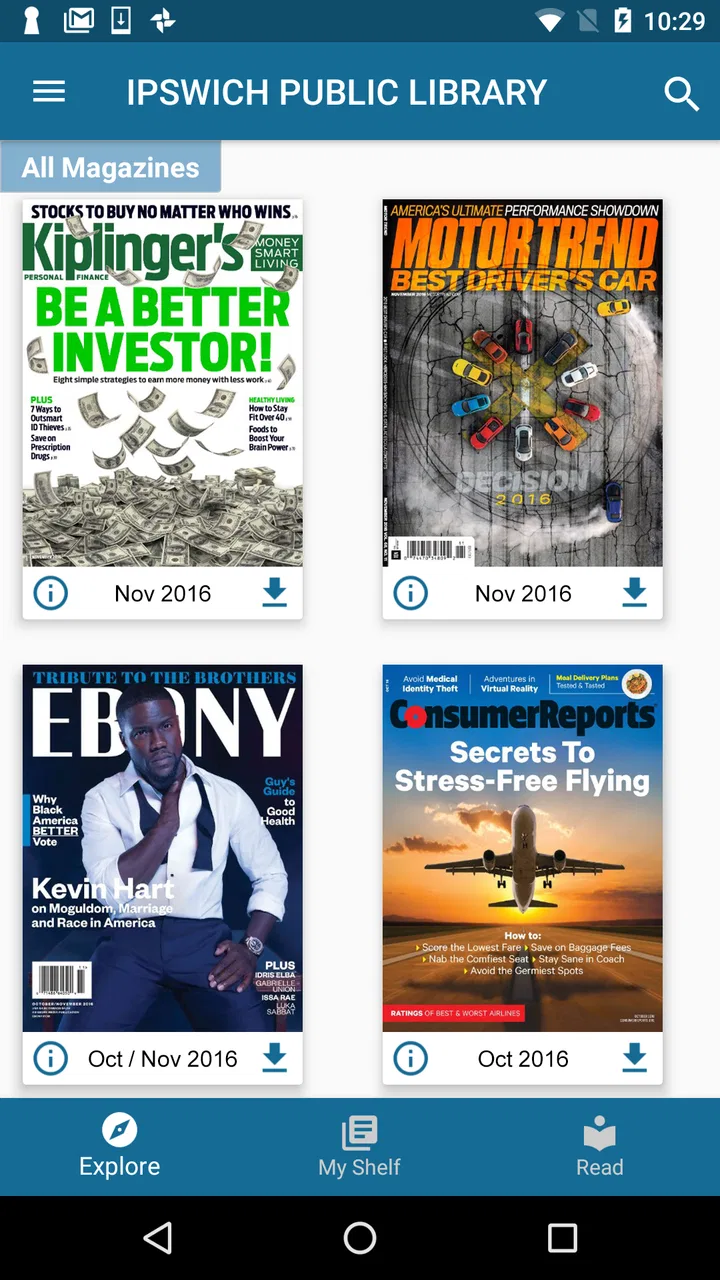
The first thing I look for in a magazine app is whether it helps me reach an issue quickly. Flipster’s usefulness depends heavily on that first library connection. If my library supports the service and I can identify it without confusion, the app becomes a direct route to the available collection. If I install it expecting an open catalog of magazines, however, the experience can feel disappointing because the service is provided courtesy of a library rather than functioning as an unrestricted newsstand.
You May Also Like

 Blood Strike: 2.5 Anniversary
Blood Strike’s Loadouts Turn Every Drop Into a Tactical Gamble
A close look at Blood Strike’s custom loadouts: how fast access to signature weapons reshapes its battle royale rhythm, rewards preparation, and narrows the gap between fights.

 Pandora - Music & Podcasts
Pandora’s Music Is Easy to Start, but Harder to Recover
Pandora’s strength is its low-effort path from a seed to a station. Its weak spot is how much confidence it asks you to place in connection, setup, and quiet recovery.

 8 Ball Pool
 Is Built on Rivalries, Rematches, and Routine
A close look at the rivalries, rematches, shared routines, and unanswered safety questions that turn a quick pool match into a persistent mobile community.

 Samsung Music
’s Quiet Strength Is Playing What You Already Own
Its reach comes less from spectacle than from dependable access to a personal library. That simplicity is both the app’s strongest retention engine and its ceiling.

 AccuWeather: Weather Radar
AccuWeather Review: A Quick, Clear Forecast for Everyday Decisions
For everyday plans, the best forecast is the one you can understand quickly. AccuWeather makes rain timing, radar, and local conditions easy to act on, with a few trade-offs.

 Hill Climb Racing
Why Hill Climb Racing Still Turns Crashes Into One More Run
A tiny car, a bumpy hill and one more upgrade: Hill Climb Racing keeps resurfacing because its simple chaos makes every near-miss feel personal.
More From Our News Desk



That library relationship is both the app’s strength and its main point of friction. I do not have to build a separate paid magazine bundle when my library already offers the titles I want. On the other hand, the choice of magazines is controlled by the library. Someone looking for a very specific publication may find that the app is excellent for browsing but not useful for that particular title.
Once I am inside an issue, the reading model is different from a normal text-first news app. Digital magazines are designed around pages, columns, photographs, captions, and visual layouts. That preserves the character of a print issue, but it also means that reading small article text on a phone can require more effort than reading a responsive web page. I find a tablet a more comfortable setting for longer sessions because the page design has more room to breathe.
A helpful habit is to separate browsing from focused reading. I use the collection view to scan covers and decide what deserves attention, then reserve a quieter moment for the longer articles. This avoids treating every issue like a stream of short headlines. Flipster works best when I accept that it is a digital shelf of complete magazines, not a continuously updated feed.
For readers who need strong visual hierarchy, magazine pages can be a mixed experience. The original layout may make a feature easy to recognize, but it can also place text in narrow columns or over images. I would not assume that every page will be equally comfortable. The practical test is simple: open a sample issue and read several pages with different designs before committing to a long session.
The app is rated for Everyone, which makes it broadly approachable from an age-label perspective, but that label does not guarantee that every reading task will suit every person. A child, older adult, or reader with low vision may still need a larger screen, stronger device-level text settings, or assistance during setup. The age rating describes the content category, not the ease of use for every ability.
Small decisions that make browsing easier
I recommend beginning with the library rather than with a magazine title. Confirming the correct library connection first prevents wasted time searching for an issue that is not part of the available collection. After that, I would make a short personal routine: browse the newest visible issues, open one familiar title to judge readability, and only then explore less familiar publications.
Another useful approach is to treat each issue as a self-contained reading project. If I open several magazines at once, it becomes harder to remember which one contained a particular article. Choosing one issue for a commute or one evening makes the service feel less cluttered. It also helps reveal whether the app fits my habits better than a general news reader.
Flipster is currently listed as version 3.5.4 and requires Android 8.0 or later. That requirement is modest enough for many older devices, but anyone using a very old phone should check compatibility before planning around it. The service is also available at no charge, although the practical value still depends on having a participating library and a collection that is worth reading.
Motor, sensory, and situational access in everyday use
Magazine reading asks more from the hands and eyes than a simple article feed. I may need to tap a cover, move between pages, adjust the device position, and zoom into a dense layout. For someone with limited fine-motor control, repeated small gestures can become tiring. A larger tablet, a stable stand, and a deliberate reading pace make a noticeable difference even when the app itself remains unchanged.
This is one reason I would avoid judging Flipster only on a phone. A compact display is convenient for a quick check, but it can force more zooming and repositioning. With a tablet resting on a desk, I can keep my hands relaxed and view more of a page at once. That setup is especially useful for readers who find continuous pinching or swiping uncomfortable.
Readers with low vision may need to rely on the accessibility tools built into their device, but I would test those tools with a real issue rather than assume they will transform the magazine layout into ordinary text. A page designed for print can behave differently from a web article when enlarged. Zooming may improve legibility while reducing the amount of context visible on screen, so there is a trade-off between readable text and easy orientation.
For readers sensitive to visual clutter, magazine covers and feature pages can be busy by nature. Photography, decorative typography, sidebars, and advertisements are part of the format. That is not a flaw unique to this app, but it means the reading experience may be less calm than a plain article reader. I find it easier to concentrate when I choose a quiet environment and turn down other notifications before opening a long feature.
Motor access also affects login and library selection. If the setup requires several precise taps, a person using one hand or an assistive input method may need extra time. I would prepare the library details in advance and complete the initial setup when I am not rushed. After that, the app becomes more practical for regular reading because the hardest part is often getting into the correct collection, not deciding which article to read.
For people who prefer listening rather than looking at a screen, Flipster should not automatically be treated as an audiobook or spoken-news solution. A digital magazine’s visual composition is central to its identity, and I would choose a dedicated audio news service when hands-free listening is the priority. Flipster is a better match for readers who want to see the issue as designed, even if they sometimes need device-level assistance to make that comfortable.
Where the app fits into real routines
One realistic scenario is a library member waiting for an appointment with a tablet and a few minutes to spare. Instead of carrying a paper magazine, I can open the library collection, browse a current issue, and read one feature without buying a single copy. That is a genuine convenience, particularly for occasional readers who do not want another recurring subscription.
A second scenario is a student or family member using a shared tablet at home. The larger screen can make page layouts easier to inspect, and the library connection can provide a range of titles without each person needing a separate account with a publisher. The limitation is that the collection may not match everyone’s interests, so the app works better as a shared discovery shelf than as a guaranteed source for one person’s favorite publication.
It can also suit someone who wants a slower alternative to headline scrolling. I sometimes prefer reading a complete issue because the editorial structure gives me a sense of place: departments, features, images, and shorter pieces belong together. That is a different experience from a personalized news feed, which is more efficient for breaking updates but often less satisfying for relaxed magazine reading.
For travel or unreliable connectivity, I would plan ahead rather than assume that every issue will be equally convenient away from home. The sensible workflow is to open the desired issue while connected, check that it is ready for reading, and avoid depending on the app for an unexpected offline session. This is a practical precaution, not a promise about how every device or issue will behave.
People who use screen readers or other assistive technologies should test the exact titles they care about. Magazine pages vary widely, and a visually attractive layout may not expose its information in the same order as a plain article. If accessible text navigation is essential, a library website, publisher page, or dedicated text-based news service may be a better companion for some content.
What remains difficult
The largest barrier is that Flipster is not useful in isolation. The library must provide access, and the available titles determine whether the app earns a permanent place on my device. That is a different model from a conventional magazine subscription, where I choose the publication first and pay for that specific relationship.
Library authentication can also be a stumbling block for people who do not know which branch or account details to use. I would not install the app at the last minute before a trip or appointment. A short setup test at home is more sensible, especially for anyone who needs larger controls, a particular input method, or help from another person.
The second barrier is the visual nature of the content. Even when the app opens correctly, a page can remain difficult because of small type, low contrast in a particular design, or text placed over photography. This is where the service differs from a standard news reader: the publisher’s layout remains part of the reading task. Device zoom can help, but it may introduce extra navigation and make it easier to lose the article’s position.
The third barrier is expectation. Someone searching for live headlines, personalized alerts, or a unified feed from many news sources may find the magazine model too slow and too dependent on browsing issues. Someone who wants a faithful digital version of a library magazine may be much happier. I would choose Flipster for curated periodical reading, not as my only news source.
Its public reception deserves a balanced interpretation. Around 100K installs show that the service has reached a meaningful audience, while the 2.5 average suggests that many users encounter enough friction to leave a poor impression. Those figures do not tell me whether a particular library’s collection will work well, so I would judge the app in context: the quality of the local catalog, the device I plan to use, and my tolerance for magazine-style navigation.
The developer, EBSCO Information Services, gives the product a clear library-information identity rather than a casual entertainment-app identity. That is useful context when deciding what to expect. I see Flipster as part of a library’s digital services, and that means its strongest value may appear for members who already use library resources regularly.
Who should choose it, and who should look elsewhere?
I would recommend trying Flipster if you have library access, enjoy complete magazine issues, and are comfortable reading on a tablet or a reasonably sized phone. It is particularly attractive for occasional readers who want to sample several titles without paying for individual subscriptions. It can also be a good option for households that already use the library and appreciate having reading material in one familiar service.
I would be more cautious if your priority is instant, text-first reading. A dedicated news app will usually be better for quick updates, adjustable article layouts, and constant topic discovery. A publisher’s own app may be preferable when one favorite title matters more than a broad library collection. And if hands-free listening or highly structured screen-reader navigation is central to your routine, an audio or text-focused alternative deserves priority.
Before deciding, I would answer four practical questions for myself: does my library support the service, are the magazines I actually want included, is my preferred device comfortable for page layouts, and can I complete the initial setup without assistance? If the answer to the first two is no, the app has little value. If the answer to the last two is no, I would test it with a single issue before relying on it.
My inclusive verdict
Flipster is a worthwhile library companion, but it is not automatically an easy reading environment for everyone. Its best quality is the access model: a free way to explore digital magazines through a library instead of committing to separate subscriptions. Its main weakness is that the same magazine layouts that preserve the character of print can create visual, motor, and navigation challenges.
I appreciate that the app can turn a spare moment into meaningful reading, especially on a tablet and with a library collection that fits my interests. I also think the experience should be approached with realistic expectations. Test the library connection, preview an issue, adjust the device for comfort, and keep a text-first or audio alternative available if you need more flexible access.
For me, the final recommendation is conditional but positive: try Flipster when your library collection is the reason you want it, not because you expect a universal magazine subscription or a complete news replacement. It is free, rated for Everyone, and supports a useful form of digital library access, yet its real success depends on the match between the reader, the device, the issue design, and the local collection.
FAQs for Flipster - Digital Magazines
01What is Flipster – Digital Magazines?
Flipster is a digital magazine reading app that lets users access participating library magazines on an Android or iOS device. After signing in through a supported library, users can browse available titles, read current and back issues, and manage downloads for offline reading. The exact magazine collection depends on the library or institution providing access.
02Is Flipster free to use?
The Flipster app can generally be downloaded for free, but access to its magazine content usually depends on having a valid library membership or institutional subscription. You may need to select your library and sign in with your library credentials. If your library does not subscribe to Flipster, installing the app alone may not provide access to the magazines.
03Can I read Flipster magazines offline?
Yes, supported magazines can typically be downloaded for offline reading after you sign in and open a title. This is useful when traveling or when you have limited internet access. Download availability and storage requirements may vary by publication, so it is a good idea to check your device’s available space and download issues while connected to Wi-Fi.
04What magazines are available on Flipster?
The available magazines depend entirely on the library or organization connected to your Flipster account. Collections may include popular lifestyle, news, entertainment, technology, hobby, and special-interest publications, but not every title is offered by every library. You can browse the catalog after selecting your institution to see the magazines and issues currently included.
05What should I do if I cannot sign in or find my library?
First, confirm that your library membership is active and that you are using the correct library card number, PIN, or institutional login details. Make sure the app is updated and your internet connection is working. If your library does not appear in the search results, or authentication continues to fail, contact the library directly because access settings are controlled by the subscribing institution.
Pros
- Large selection of popular magazines in one subscription.
- Offline downloads make reading possible without an internet connection.
- Clean interface makes browsing and opening issues straightforward.
- Personalized recommendations help users discover new publications.
- Adjustable text size improves readability on compatible magazine content.
Cons
- Some titles or issues may be unavailable in certain countries.
- The subscription may be expensive for users who read only occasionally.
- Downloaded issues can consume considerable storage space.
- Not every magazine offers an optimized reading experience.
- Access ends when the subscription is canceled or expires.

Flipster - Digital Magazines
Gallery